Introduction
In previous part we implemented user authentication, manage courses page & user progress.
In this final part of the series, we will learn how to implement rating system, cart feature & payment with Stripe.
Building cart feature
Go to the Content-Type builder and then click on “Create new collection type”
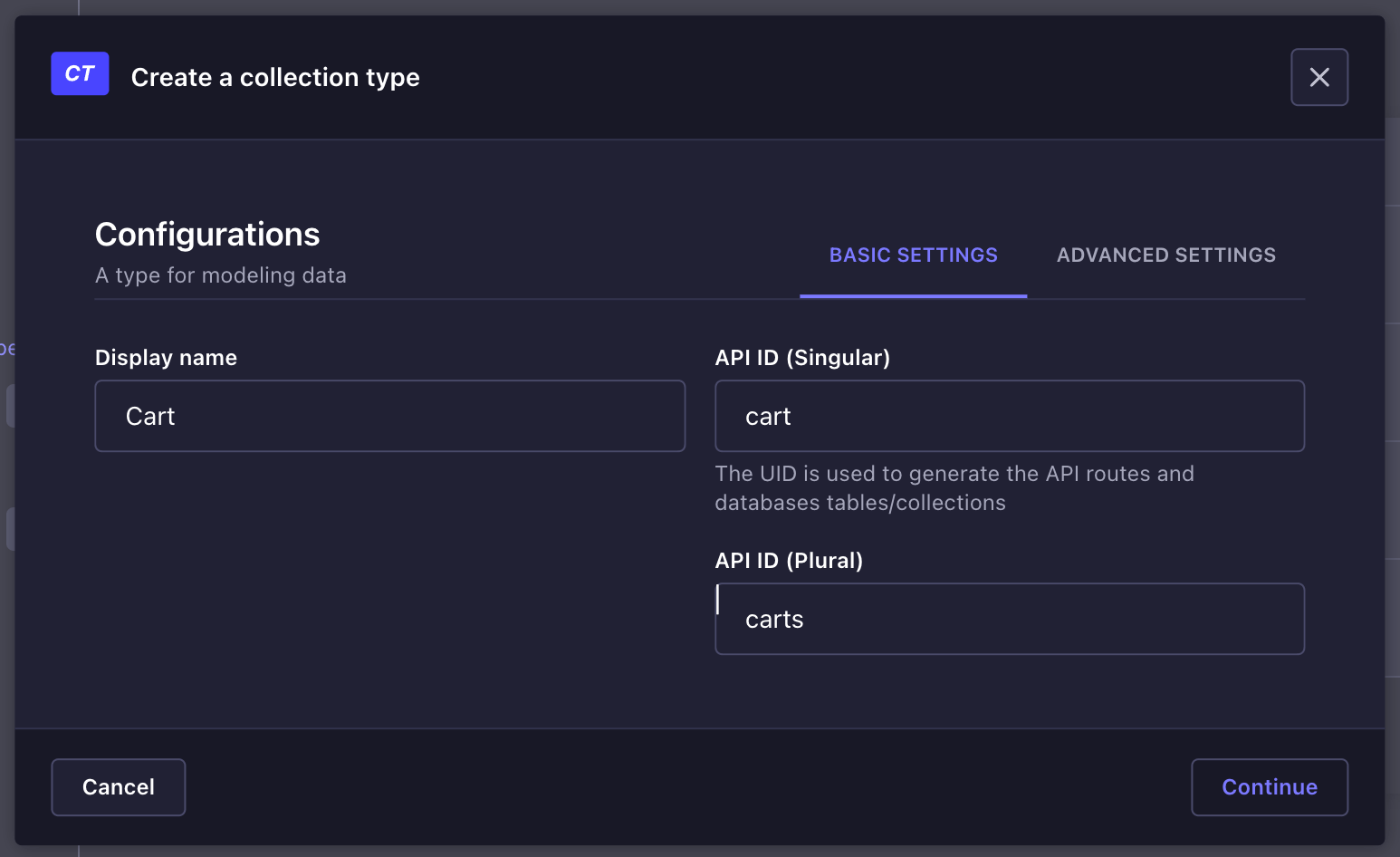
Then add these fields user: Relation - Cart has one user (Userfrom user permission plugin) courses: Relation - Cart has many Courses
Then let’s create a context to hold the cart data.
Now we need to configure the permissions for the Authenticated user in Users & permissions plugin => Roles.
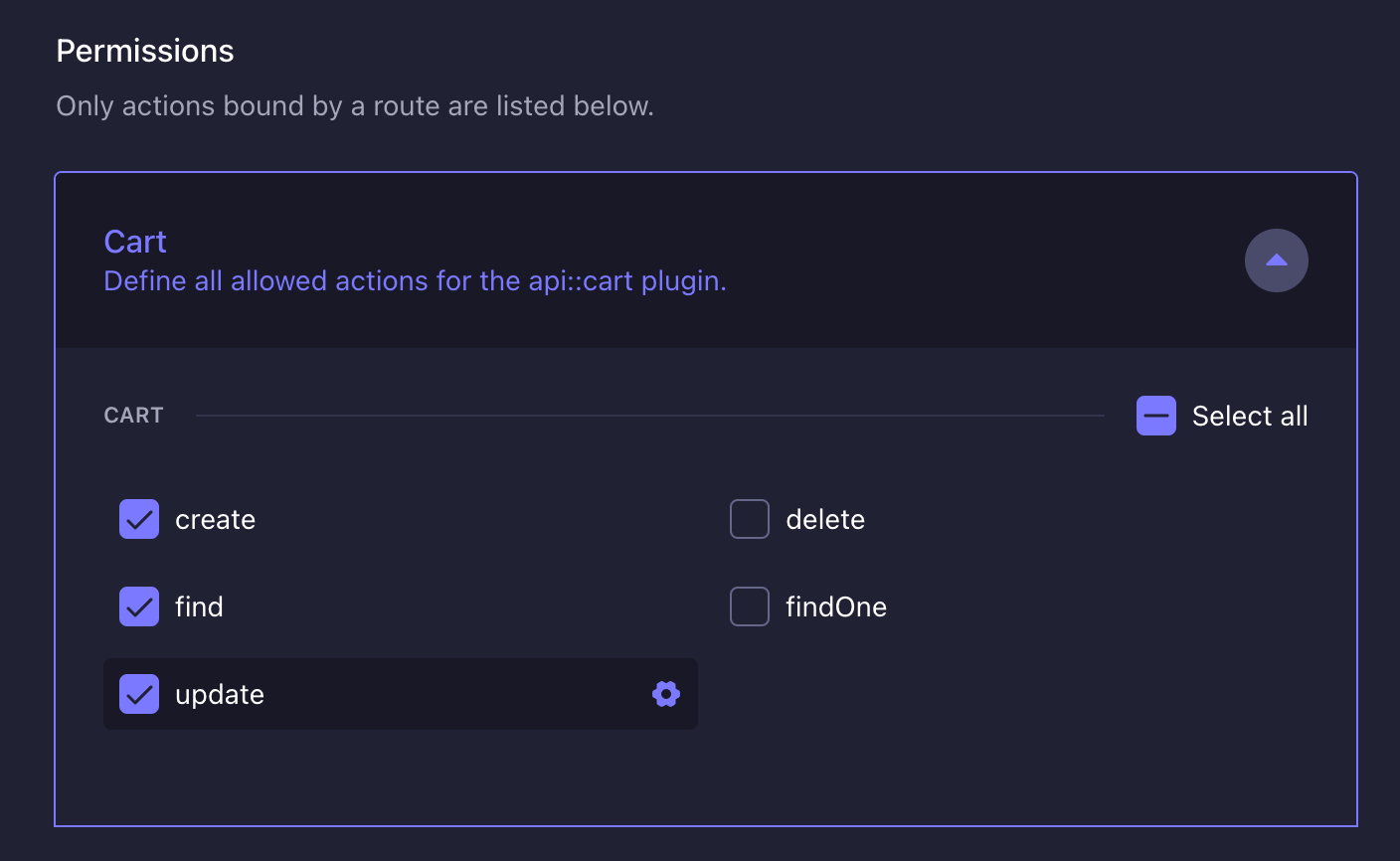
To be able to easily access & modify the cart we need to create hooks & utility function
frontend/hooks/useCart.js
import { useEffect, useState } from "react";
import axios from "axios";

export const useCart = () => {
  const [userCart, setUserCart] = useState([]);
  const [loading, setLoading] = useState(true);

  const fetchUserCart = async () => {
    try {
      const token = localStorage.getItem("token");
      const currentUser = JSON.parse(localStorage.getItem("user"));
      const config = {
        headers: { Authorization: `Bearer ${token}` },
      };
      const response = await axios.get(
        `http://localhost:1337/api/carts?filters[user][id][$eq]=${currentUser.id}&populate=courses`,
        config,
      );

      const cartData = response.data.data;
      setUserCart(cartData[0]);
    } catch (error) {
      console.error("Error fetching user cart:", error);
    } finally {
      setLoading(false);
    }
  };

  useEffect(() => {
    fetchUserCart();
  }, []);

  const removeFromCart = async (courseId, cartId) => {
    const token = localStorage.getItem("token");
    const config = {
      headers: { Authorization: `Bearer ${token}` },
    };
    try {
      await axios.put(
        `http://localhost:1337/api/carts/${cartId}`,
        {
          data: {
            courses: {
              disconnect: [courseId],
            },
          },
        },
        config,
      );
      fetchUserCart();
    } catch (error) {
      console.error("Error removing from cart:", error);
    }
  };

  return { userCart, loading, removeFromCart, fetchUserCart };
};

export const addToCart = async (cart, course, toast) => {
  const token = localStorage.getItem("token");
  const currentUser = JSON.parse(localStorage.getItem("user"));
  const config = {
    headers: { Authorization: `Bearer ${token}` },
  };

   if (cart?.length === 0 || !cart) {
    try {
      await axios.post(
        `http://localhost:1337/api/carts`,
        {
          data: {
            user: {
              connect: [currentUser.documentId],
            },
            courses: {
              connect: [course.documentId],
            },
          },
        },
        config,
      );
      toast({
        title: "Success",
        description: "Course added to cart",
        duration: 3000,
        variant: "success",
      });
    } catch (error) {
      console.error("Error adding to cart:", error);
    }
  } else {
    try {
      const response = await axios.put(
        `http://localhost:1337/api/carts/${cart.documentId}`,
        {
          data: {
            courses: {
              connect: [course.documentId],
            },
          },
        },
        config,
      );
      toast({
        title: "Success",
        description: "Course added to cart",
        duration: 3000,
        variant: "success",
      });
    } catch (error) {
      console.error("Error adding to cart:", error);
    }
  }
};
In the code above we defines a custom React hook, useCart, which manages a user’s shopping cart by fetching, adding, and removing courses.
Additionally, the addToCart function is defined to handle adding courses to the cart, providing user feedback through a toast notification upon success.
We need to create a component for adding course to cart from the course overview page in frontend/app/course/[slug]/page.js
Let’s name it Sidebar
frontend/components/Sidebar.jsx
"use client";
import { Button } from "@/components/ui/button";
import { Card, CardHeader, CardTitle, CardContent } from "@/components/ui/card";
import { useCart, addToCart } from "@/hooks/useCart";
import Link from "next/link";
import { useToast } from "@/hooks/use-toast";

const Sidebar = ({ course }) => {
  const { toast } = useToast();
  const { userCart, fetchUserCart } = useCart();

  const handleAddToCart = async () => {
    await addToCart(userCart, course, toast);
    await fetchUserCart();
  };

  return (
    <Card className="w-96 border p-6">
      <img src={course.thumbnail} alt="course thumbnail" />
      <CardHeader>
        <CardTitle>
          <span className="text-2xl font-bold">{`$${course.price}`}</span>
        </CardTitle>
      </CardHeader>
      <CardContent>
        {currentUser && userCart?.courses?.filter((item) => item.id === course.id).length >
        0 ? (
          <Link href="/cart">
            <Button className="w-full bg-blue-500 text-white">
              Go to cart
            </Button>
          </Link>
        ) :
              currentUser && (
          <Button
            className="w-full bg-blue-500 text-white"
            onClick={handleAddToCart}
          >
            Add to cart
          </Button>
        )}
      </CardContent>
    </Card>
  );
};

export default Sidebar;
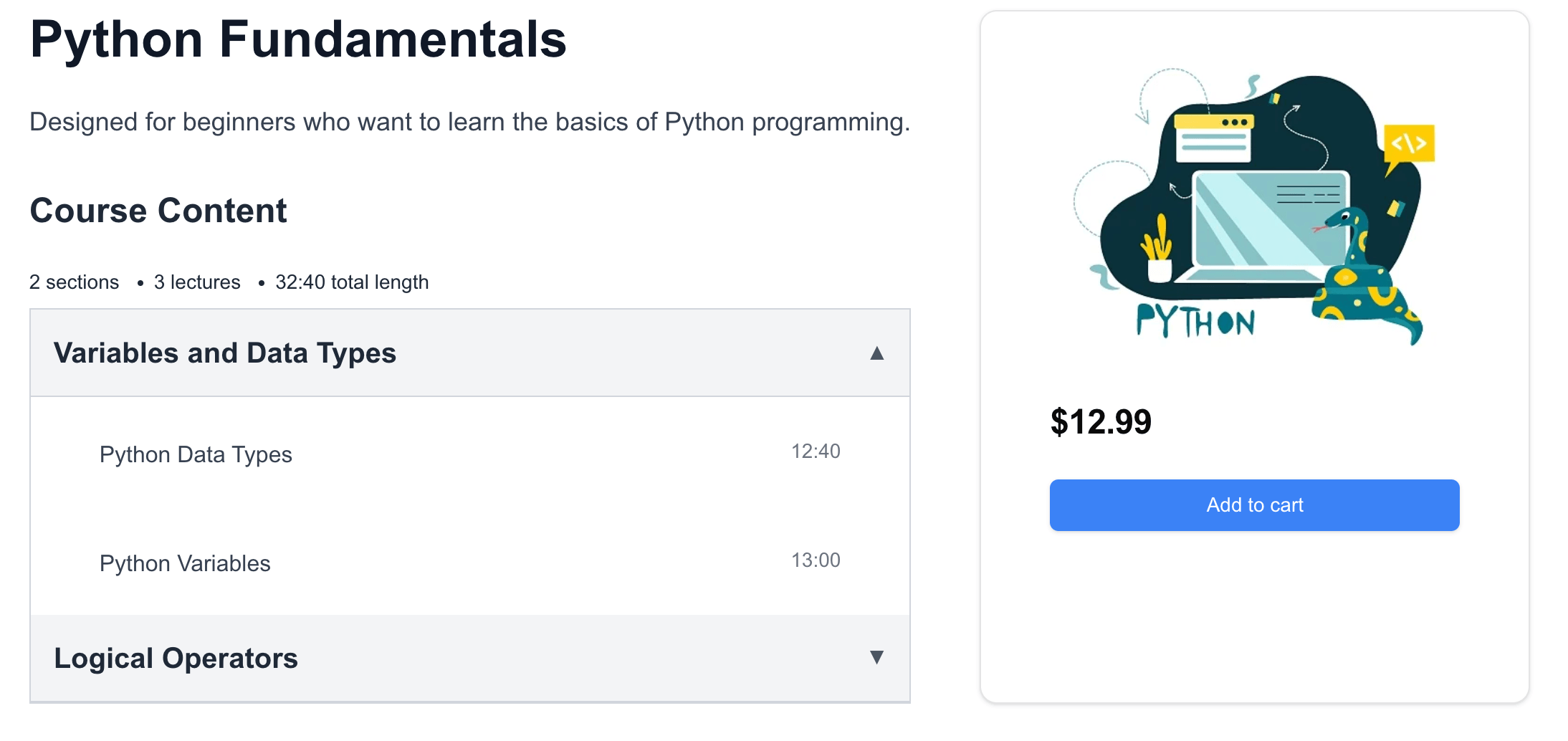
In this component we call the useCart hooks and then display add to cart button if course is not already in the cart, if it’s already in the cart we display a link to the cart page.
After that modify frontend/app/course/[slug]/page.js to display <Sidebar course={course} />
Now Course overview page will look like this.
Lastly, we need to create cart page.
frontend/app/cart/page.jsx
"use client";
import Navbar from "@/components/Navbar";
import {
  Card,
  CardContent,
  CardHeader,
  CardFooter,
} from "@/components/ui/card";
import { Button } from "@/components/ui/button";
import { Check, Delete } from "lucide-react";
import Loader from "@/components/Loader";
import { useCart } from "@/hooks/useCart";

const CartPage = () => {
  const { userCart, loading, removeFromCart } = useCart();

  const handleRemoveFromCart = (courseId, cartId) => {
    removeFromCart(courseId, cartId);
  };

  if (loading) return <Loader />;

  return (
    <div className="min-h-screen bg-gray-100 pt-4 px-24">
      <Navbar />
      <main className="container mx-auto px-4 py-8">
        <div className="flex gap-12">
          <div className="flex-1">
            <h1 className="text-3xl font-semibold mb-6">Shopping Cart</h1>
            {userCart?.courses?.length === 0 || !userCart?.courses ? (
              <p className="text-center text-gray-500">Your cart is empty</p>
            ) : (
              <div className="space-y-4">
                {userCart.courses.map((item) => {
                  return (
                    <Card
                      key={item.id}
                      className="bg-white shadow-md rounded-md max-w-2xl"
                    >

                      <CardContent className="flex gap-4 pt-6">
                        <img className='w-24' src={item.thumbnail} alt="course thumbnail" />
                        <div>
                        <h2 className="text-lg font-semibold">{item.title}</h2>
                        <p className="font-bold text-xl">${item.price}</p>
                        </div>
                        {/* Add any additional item details here */}
                      </CardContent>
                      <CardFooter className="flex justify-end">
                        <Button
                          variant="outline"
                          color="red"
                          onClick={() =>
                            handleRemoveFromCart(
                              item.documentId,
                              userCart.documentId,
                            )
                          }
                          className="flex items-center space-x-2"
                        >
                          <Delete className="w-5 h-5" />
                          <span>Remove</span>
                        </Button>
                      </CardFooter>
                    </Card>
                  );
                })}
              </div>
            )}
          </div>
        </div>
      </main>
    </div>
  );
};

export default CartPage;
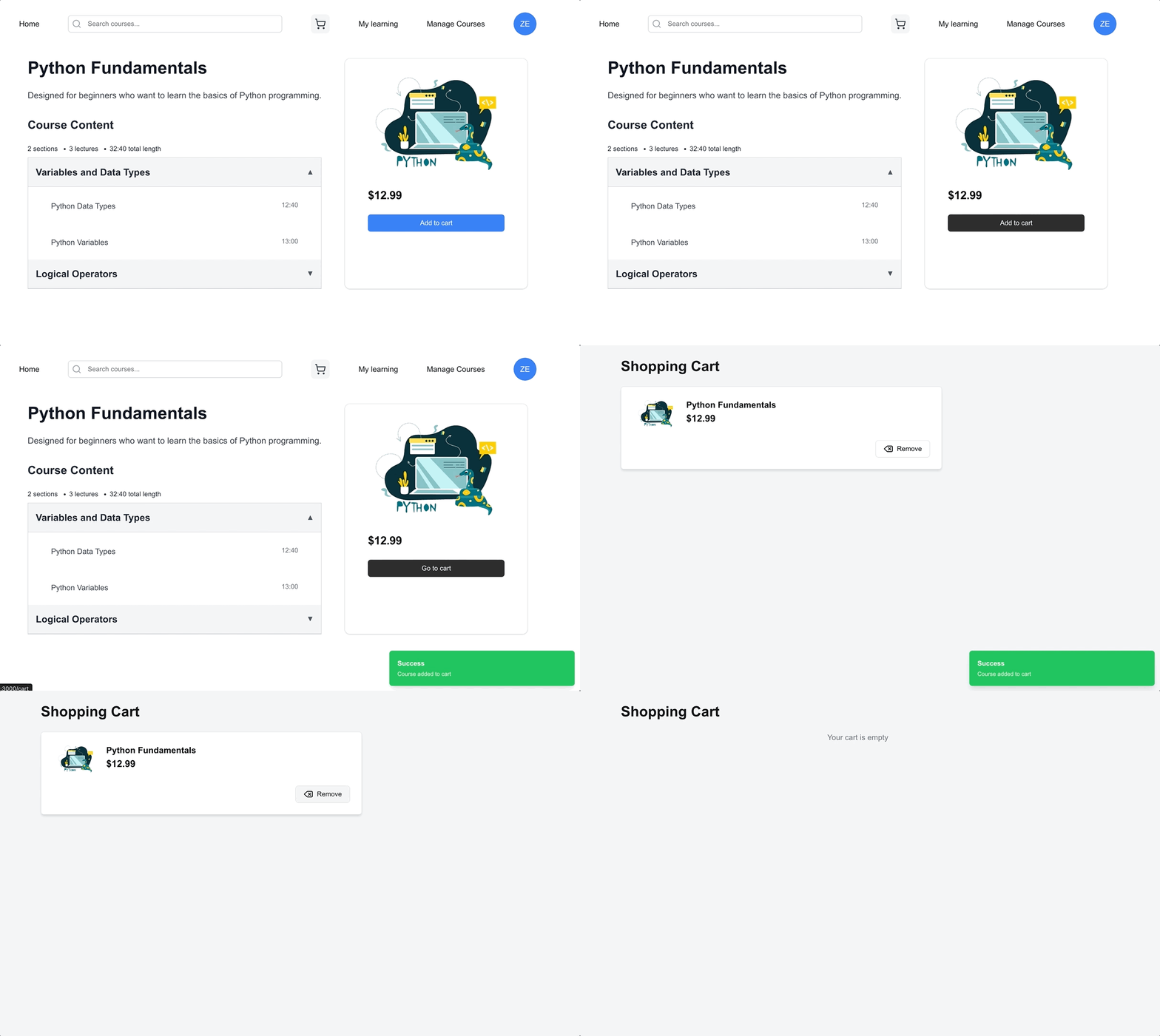
Now we have the full flow for cart feature.
Implementing checkout & payment with Stripe
You will need to sign up for a stripe account to implement this feature.
If you already have an account, then configure this ENV variables in frontend
.env.local
NEXT_PUBLIC_STRIPE_PUBLIC_KEY=YOUR_PUBLIC_KEY
STRIPE_SECRET_KEY=YOUR_SECRET_KEY
NEXT_PUBLIC_URL=http://localhost:3000
Get publishable key from this page
https://dashboard.stripe.com/test/apikeys
Install Stripe SDK
npm install @stripe/stripe-js stripeAnd then create API endpoint to pass cart data to Stripe.
frontend/app/api/checkout/route.js
import { NextResponse } from "next/server";
import Stripe from "stripe";

const stripe = new Stripe(process.env.STRIPE_SECRET_KEY, {
  apiVersion: "2022-11-15",
});

export async function POST(request) {
  const { items, token,cartId } = await request.json();

  const courseIds = items.map((item) => item.courseId);

  const session = await stripe.checkout.sessions.create({
    payment_method_types: ["card"],
    line_items: items.map((item) => ({
      price_data: {
        currency: "usd",
        product_data: {
          name: item.name,
        },
        unit_amount: item.price * 100,
      },
      quantity: item.quantity,
    })),
    payment_intent_data: {
      metadata: {
        courseIds: JSON.stringify(courseIds),
        token: token,
        cartId: cartId
      },
    },
    expand: ["line_items"],
    mode: "payment",
    success_url: `${process.env.NEXT_PUBLIC_URL}/success`,
    cancel_url: `${process.env.NEXT_PUBLIC_URL}/cancel`,
  });

  return NextResponse.json({ id: session.id });
}
In the code above we are passing back the courseId’s, user token & cartId to our webhook if the payment is succesful.
Next, we need to create this webhook to detect if payment is succesful.
frontend/app/api/stripe_webhooks/route.js
import { NextResponse } from "next/server";
import axios from "axios";

export async function POST(request) {
  try {
    const body = await request.json();

    if (body.type === "payment_intent.succeeded") {
      const metadata = body.data.object.metadata;
      const courseIds = JSON.parse(metadata.courseIds);
      const token = metadata.token;
      const cartId = metadata.cartId;

      const config = {
        headers: { Authorization: `Bearer ${token}` },
      };
      try {
        const res = await axios.put(
          `http://127.0.0.1:1337/api/carts/${cartId}`,
          {
            data: {
              courses: {
                disconnect: [...courseIds],
              },
            },
          },
          config,
        );
        console.log(res.status, res.statusText, "res");
      } catch (error) {
        console.error("Error removing from cart:", error);
      }

      try {
        const updateCoursePromises = courseIds.map((courseId) =>
          axios.put(
            `http://127.0.0.1:1337/api/courses/${courseId}`,
            {
              data: {
                isPurchased: true,
              },
            },
            config,
          ),
        );

        const responses = await Promise.all(updateCoursePromises);
      } catch (error) {
        console.error("Error updating courses:", error);
      }
    }

    return NextResponse.json({ success: true });
  } catch (error) {
    console.error("Error parsing request body:", error);
    return NextResponse.json(
      { success: false, error: "Invalid request body" },
      { status: 400 },
    );
  }
}
In the code above, when the payment is succesful we are doing 2 things:
- Removing the course from the user cart
- Updating isPurchased field to true
Additionally, we will create a page for user to get redirected to if they have succesful payment and when they cancelled the payment.
frontend/app/success/page.jsx
import Navbar from '@/components/Navbar';

const SuccessPage = () => (
  <div className="min-h-screen bg-gray-100 p-4 text-center px-24">
    <Navbar/>
    <h1 className="text-3xl font-semibold mb-6 mt-12">Payment Successful!</h1>
    <p>Thank you for your purchase.</p>
  </div>
);

export default SuccessPage;
For the cancellation create this page
frontend/app/cancel/page.jsx
import Navbar from '@/components/Navbar';

const CancelPage = () => (
  <div className="min-h-screen bg-gray-100 p-4 text-center px-24">
    <Navbar />
    <h1 className="text-3xl font-semibold mb-6 mt-12">Payment Cancelled</h1>
    <p>Your payment was cancelled. Please try again.</p>
  </div>
);

export default CancelPage;;
Now for the checkout button
frontend/components/CheckoutCart.jsx
"use client";
import React from "react";
import { loadStripe } from "@stripe/stripe-js";
import { useCart } from "@/hooks/useCart";
import { Button } from "@/components/ui/button";

const stripePromise = loadStripe(process.env.NEXT_PUBLIC_STRIPE_PUBLIC_KEY);

const CheckoutCart = () => {
  const { userCart } = useCart();

  const handleCheckout = async () => {
    const response = await fetch("/api/checkout", {
      method: "POST",
      headers: {
        "Content-Type": "application/json",
      },
      body: JSON.stringify({
        items: userCart.courses.map((item) => ({
          name: item.title,
          quantity: 1,
          price: item.price,
          courseId: item.documentId,
        })),
        token: localStorage.getItem('token'),
        cartId: userCart.documentId
      }),
    });

    const { id } = await response.json();
    const stripe = await stripePromise;
    stripe.redirectToCheckout({ sessionId: id });
  };

  return (
    <div className="min-h-screen bg-gray-100 p-4">
      <h1 className="text-3xl font-semibold mb-6">Checkout</h1>
      <Button
        onClick={handleCheckout}
        className="bg-blue-500 text-white px-4 py-2 rounded-md"
      >
        Checkout with Stripe
      </Button>
    </div>
  );
};

export default CheckoutCart;
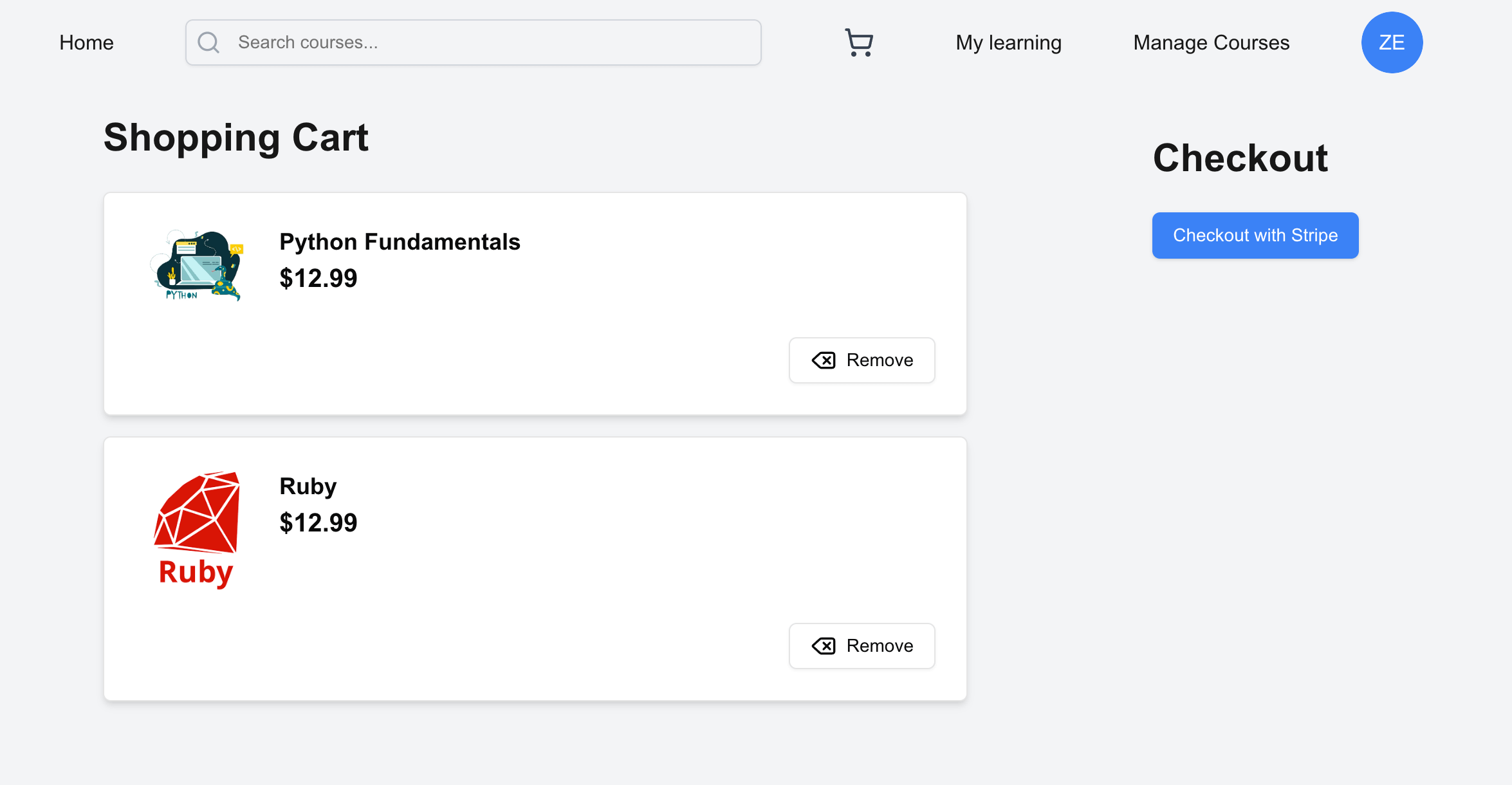
In the code above we are iterating through cart array which contains courses and pass it as line items to Stripe SDK.
And then in frontend/app/cart/page.jsx conditionally render the checkout button.
{userCart?.courses?.length > 0 && (
   <CheckoutCart />
)}
Lastly, let’s modify the course frontend/app/my-learning/[courseSlug]/page.jsx to only allow user that already purchased to access the content.
import { useRouter } from "next/navigation";

 const router = useRouter();
//  ... existing code
//  if (isLoading) return <Loader />;

  if (!course.isPurchased) {
    router.push(`/`);
  }
Testing the payment
Now to test it properly we will need Stripe CLI
In mac you can use brew install stripe/stripe-cli/stripe, you can find the equivalent command for windows here https://docs.stripe.com/stripe-cli
In the frontend run the following command
stripe listen --forward-to localhost:3000/api/stripe_webhooks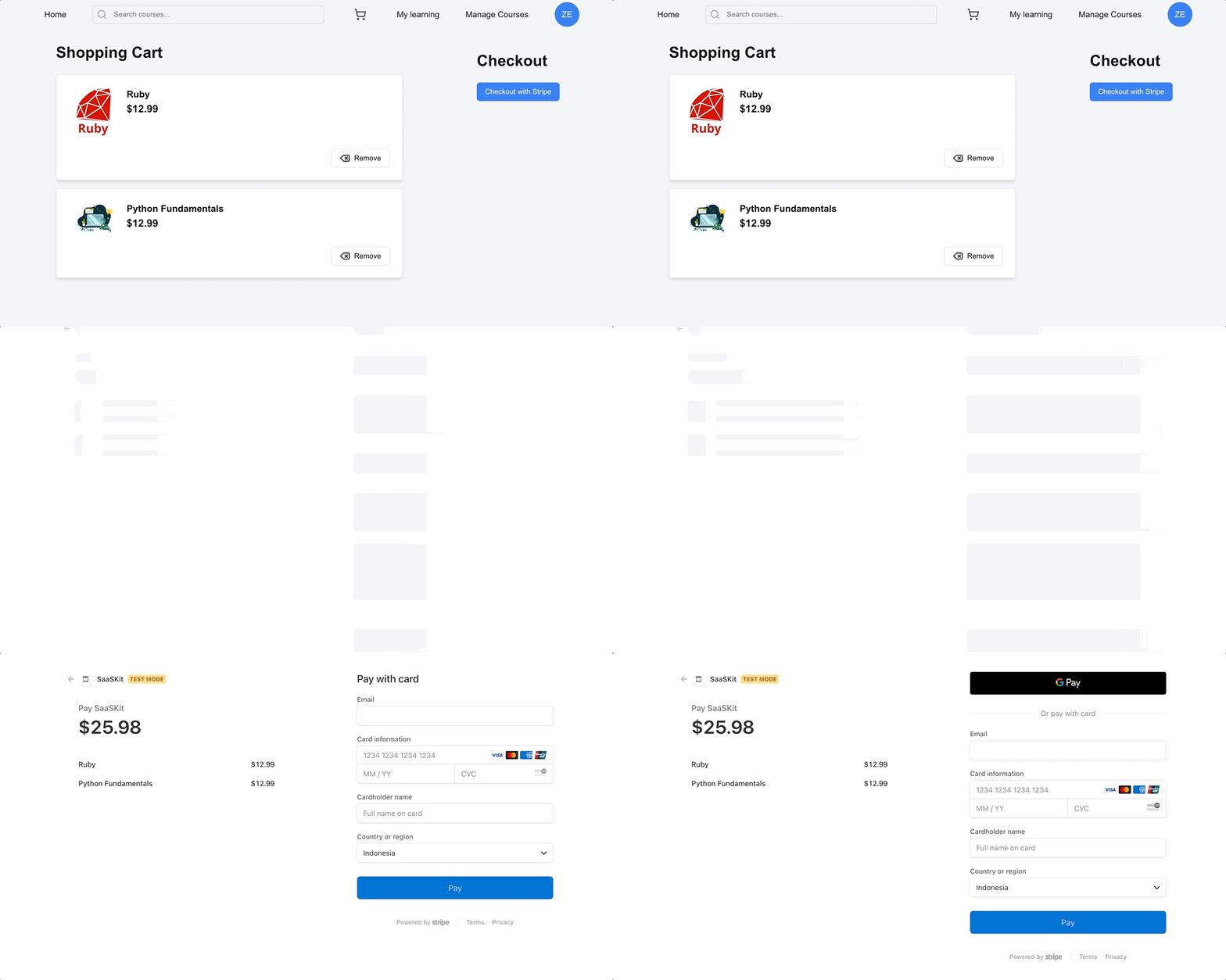
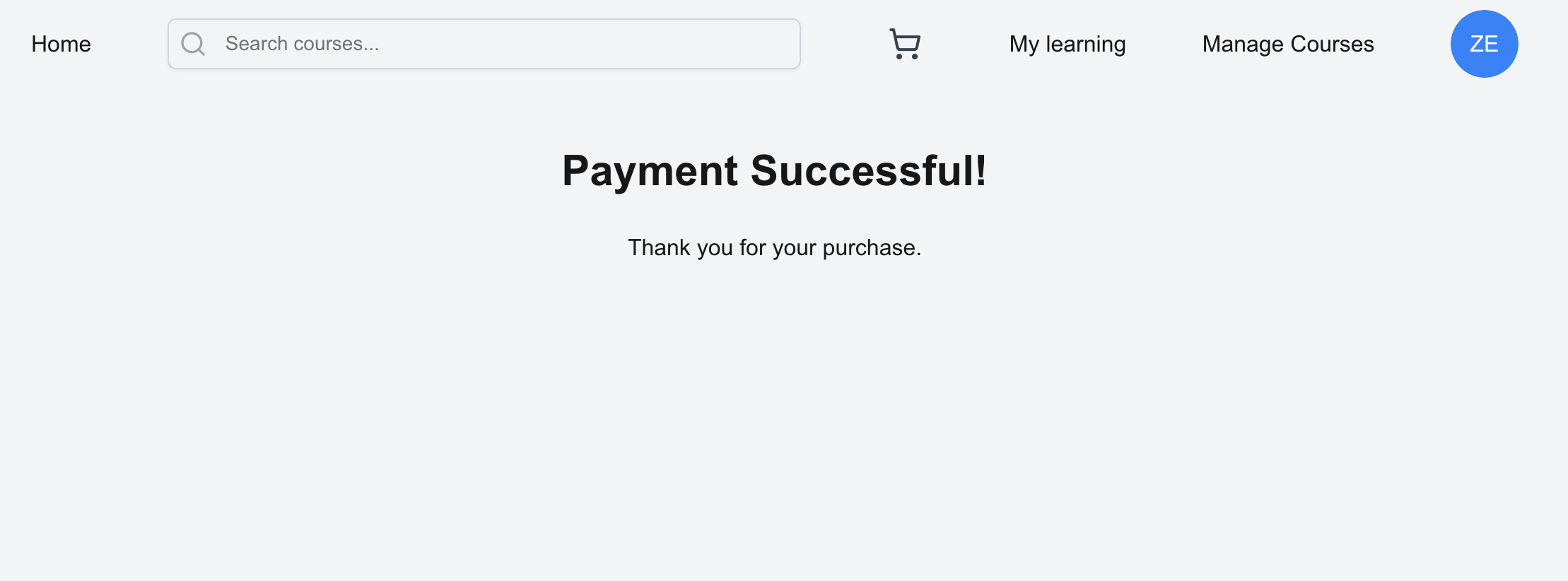
After succesful payment you will get redirected to this page
Implementing course rating system
Create Rating collection
Go to the Content-Type builder, and then create new collection type and name it “Rating”.
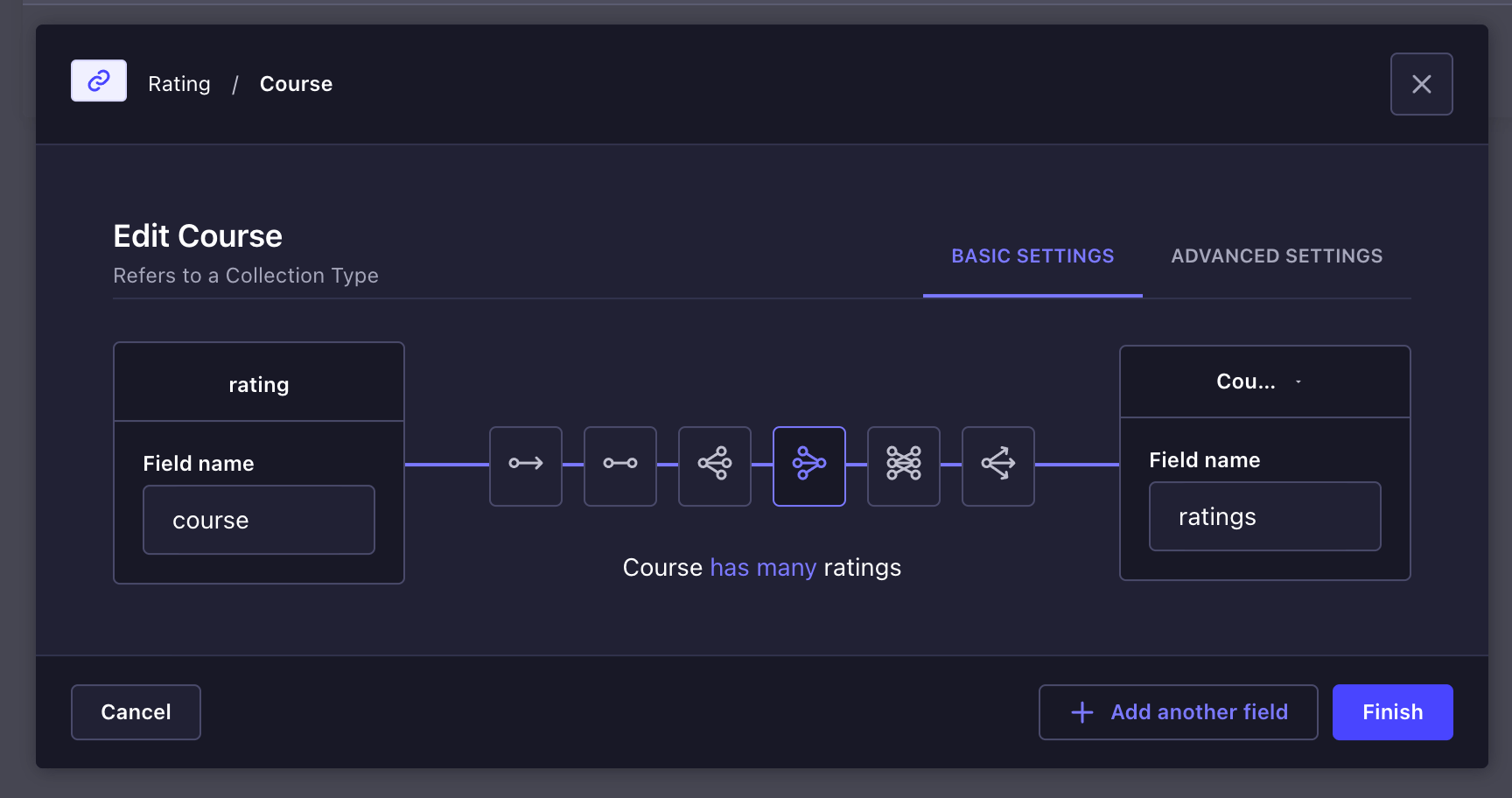
Then configure the following fields.
- Relation, Course has many ratings
- Relation, User has many ratings
- rating, number with type Integer
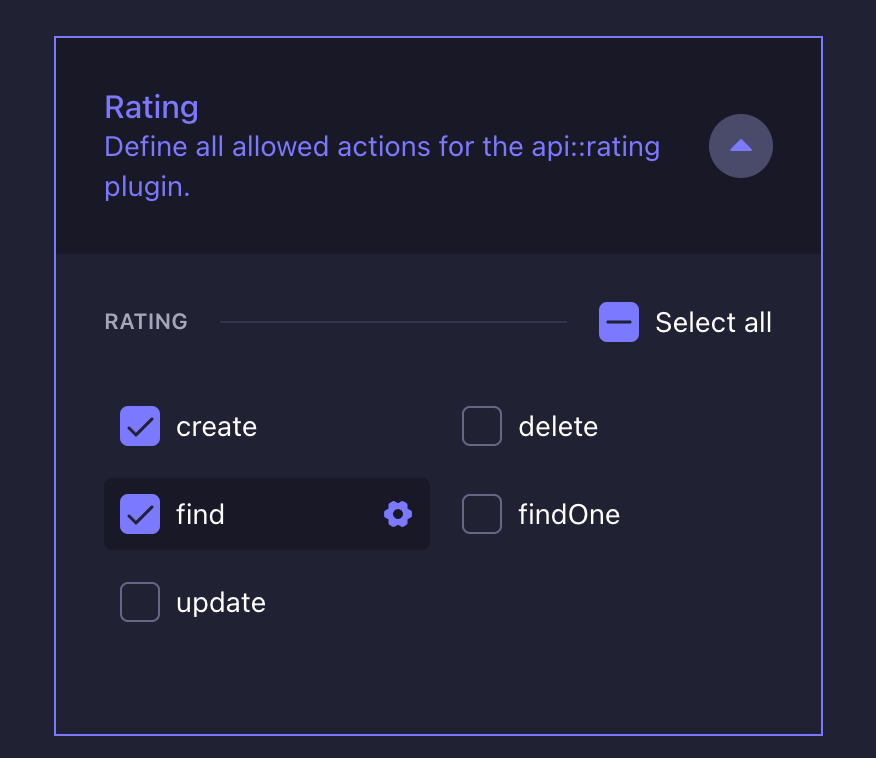
After that configure permissions for ratings
Go to Users & permission plugin => Roles => Authenticated
Now let’s create the UI, In frontend run
npx shadcn@latest add dialogThen create this component frontend/components/CourseRatingDialog.jsx
import React, { useState } from "react";
import {
  Dialog,
  DialogContent,
  DialogHeader,
  DialogTitle,
  DialogTrigger,
} from "@/components/ui/dialog";
import { Button } from "@/components/ui/button";
import { Star } from "lucide-react";
import axios from "axios";

const CourseRatingDialog = ({
  selectedCourse,
  setSelectedCourse,
  setCourseProgresses,
  isAlreadyRated,
  fetchCourseProgresses,
}) => {
  const [rating, setRating] = useState(0);
  const [tempRating, setTempRating] = useState(0);
  const [isOpen, setIsOpen] = useState(false);

  const getRatingText = (rating) => {
    switch (rating) {
      case 1:
        return "Very Bad";
      case 2:
        return "Bad";
      case 3:
        return "Good";
      case 4:
        return "Great";
      case 5:
        return "Excellent";
      default:
        return "Rate this course";
    }
  };

  const handleStarClick = (star) => {
    setRating(star);
    setTempRating(star);
  };

  const handleOpen = () => {
    setIsOpen(true);
    setSelectedCourse(selectedCourse);
  };

  const handleClose = () => {
    setIsOpen(false);
    setSelectedCourse(null);
    setRating(0);
    setTempRating(0);
  };

  const handleRating = async () => {
    if (!selectedCourse || !rating) return;

    try {
      const currentUser = localStorage.getItem("user");
      const token = localStorage.getItem("token");
      const currentUserId = JSON.parse(currentUser).documentId;
      const config = {
        headers: { Authorization: `Bearer ${token}` },
      };
      await axios.post(
        "http://localhost:1337/api/ratings",
        {
          data: {
            rating: rating,
            course: {
              connect: [selectedCourse.documentId],
            },
            user: {
              connect: [currentUserId],
            },
          },
        },
        config,
      );
      setCourseProgresses((prevProgresses) =>
        prevProgresses.map((progress) =>
          progress.course.id === selectedCourse.id
            ? { ...progress, userRating: rating }
            : progress,
        ),
      );
      fetchCourseProgresses();
      setSelectedCourse(null);
      setRating(0);
      setTempRating(0);
      handleClose();
    } catch (error) {
      console.error("Error saving rating:", error);
    }
  };

  return (
    <Dialog open={isOpen} onOpenChange={setIsOpen}>
      <DialogTrigger asChild>
        <div onClick={handleOpen} className="cursor-pointer">
          <div className="flex gap-1">
            {[1, 2, 3, 4, 5].map((star) => (
              <Star
                key={star}
                className={`h-4 w-4 cursor-pointer ${
                  star <= (isAlreadyRated?.rating || 0)
                    ? "text-yellow-400 fill-yellow-400"
                    : "text-gray-300"
                }`}
              />
            ))}
          </div>
          {isAlreadyRated ? (
            <p className="text-sm mt-1">Your rating</p>
          ) : (
            <p className="text-sm mt-1">Leave a rating</p>
          )}
        </div>
      </DialogTrigger>
      <DialogContent>
        <DialogHeader>
          <DialogTitle>Rate this course</DialogTitle>
        </DialogHeader>
        <div className="flex flex-col items-center">
          <h2 className="text-xl mb-4">{selectedCourse?.title}</h2>
          <div className="flex flex-col items-center mb-4">
            <div className="flex mb-2">
              {[1, 2, 3, 4, 5].map((star) => (
                <Star
                  key={star}
                  className={`h-8 w-8 cursor-pointer ${
                    star <= (tempRating || rating || 0)
                      ? "text-yellow-400 fill-yellow-400"
                      : "text-gray-300"
                  }`}
                  onClick={() => handleStarClick(star)}
                  onMouseEnter={() => setTempRating(star)}
                  onMouseLeave={() => setTempRating(rating)}
                />
              ))}
            </div>
            <span className="text-sm">{getRatingText(tempRating)}</span>
          </div>
          <Button className="px-4 py-2" onClick={handleRating}>
            Submit Rating
          </Button>
        </div>
      </DialogContent>
    </Dialog>
  );
};

export default CourseRatingDialog;
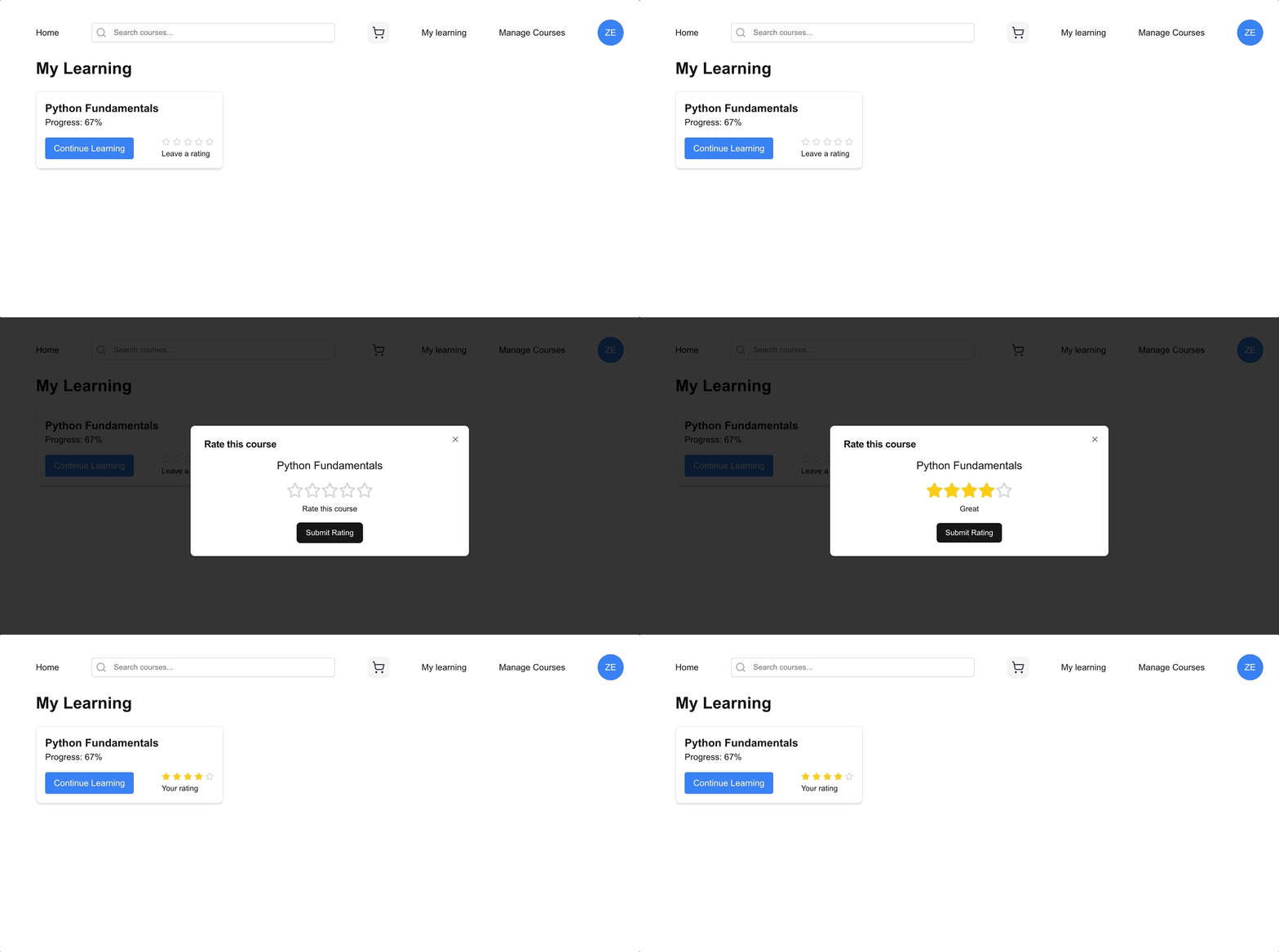
The CourseRatingDialog component will allow users to rate a course through a star-based interface within a dialog.
And then modify frontend/app/my-learning/page.jsx
import CourseRatingDialog from "@/components/CourseRatingDialog";

 const [selectedCourse, setSelectedCourse] = useState(null);
  const currentUser = JSON.parse(localStorage.getItem("user"));

  const fetchCourseProgresses = async () => {
    try {
      const token = localStorage.getItem("token");

      const config = {
        headers: { Authorization: `Bearer ${token}` },
      };
      const response = await axios.get(
        `http://127.0.0.1:1337/api/course-progresses?filters[user][id][$eq]=${currentUser.id}&[populate][course][populate][ratings][populate]=user`,
        config,
      );
      setCourseProgresses(response.data.data);
      setIsLoading(false);
    } catch (error) {
      console.error("Error fetching course progresses:", error);
      setIsLoading(false);
    }
  };

  useEffect(() => {
    fetchCourseProgresses();
  }, []);
// ...rest of code
<div className="flex justify-between items-center mt-4">
    <Link
      href={`/my-learning/${progress.course.slug}`}
      className="inline-block bg-blue-500 text-white px-4 py-2 rounded hover:bg-blue-600"
    >
      Continue Learning
    </Link>
    <CourseRatingDialog
      isAlreadyRated={progress.course.ratings.find(
        (rating) => rating.user.id === currentUser.id,
      )}
      selectedCourse={progress.course}
      setSelectedCourse={setSelectedCourse}
      setCourseProgresses={setCourseProgresses}
      fetchCourseProgresses={fetchCourseProgresses}
    />
  </div>
// ...rest of code
This is the result
Conclusion
In the this final part of the article series, we’ve learned how to implement rating system, cart feature & payment with Stripe.
You can find the full code in https://github.com/ZehaIrawan/strapi-udemy-clone